 Agentic Engineering Extension
Agentic Engineering Extension
Agentic Engineering Extension
A step-by-step walkthrough of what you actually see, from opening a
project to running, editing, and evaluating it. Every screenshot on
this page is a real screenshot of the extension running against the
bundled fixtures/sample-langgraph-project, not a mockup.
Open the root folder of a LangGraph or CrewAI project, or run Agentic: Open Sample Project from the Command Palette to try a bundled sample instantly, then open the graph view.
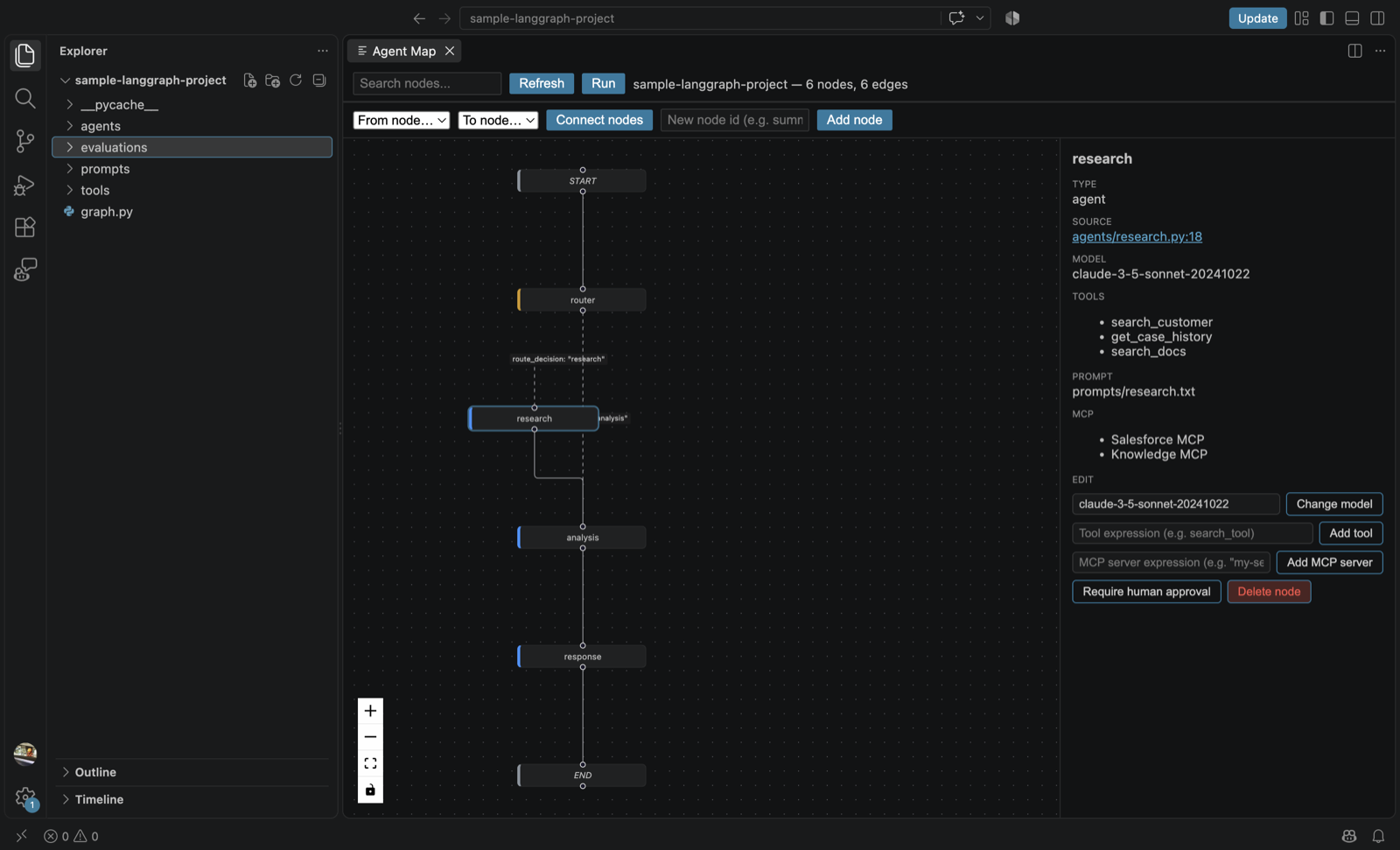
The full Agent Map for sample-langgraph-project: every node, edge, and branch statically discovered from source, themed to match the editor.
Click any node to open its inspector panel on the right. Everything shown here is parsed directly from your source, never guessed — if a field can't be confirmed, it's left out.
agents/research.py:18) to jump straight to that exact line in your editor.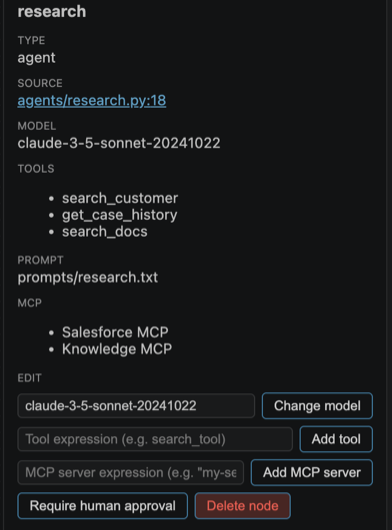
Real, sourced metadata for a single node — model, tools, prompt file, and MCP servers.
The Run button in the toolbar executes the real, compiled LangGraph — not a simulation.

The Run button in the graph toolbar, next to search and refresh.
Changes made in the graph are written back to your real Python source, not kept as an in-memory diagram.
Wiring up a new edge or adding a node directly from the toolbar.
Run a dataset of test cases against your graph and get flagged the moment something that used to pass starts failing.
evaluations/smoke.json, or generate one with Agentic: Create Evaluation Dataset. The shape is:
{
  "name": "smoke-test",
  "evaluator": { "kind": "contains" },
  "cases": [
    { "id": "greeting", "input": { "question": "hello" }, "expected": "\"response\"" }
  ]
}
evaluator.kind controls how expected is compared against the actual output: "exactMatch" (default, strict equality — rarely useful for LLM output), "contains" (checks a substring, the most common choice), "noError" (just checks the run didn't throw), or "custom" (point modulePath at your own Node module exporting a comparison function for arbitrary logic).
10 commands that analyze your real graph and code. LLM-backed
answers always cite real file:line locations and say
"I don't know" rather than invent one.

Real output from Agentic: Find Missing Error Handling, citing real nodes and file:line locations.
Ready to try it on your own project? Install from the Marketplace.